
Another round of updates has gone into production this week, and the team are making steady progress on getting RoboShadow ready to take on AI-enabled attackers. A lot of what goes into each release starts with your feedback, so thank you to everyone who has been in touch since the last one, and please do keep your ideas coming.
The headline update this time is the expansion of tenancy-wide vulnerability reporting, which now covers antivirus, OS updates, data and disks, hardware and software. If you're an MSP or a multi-organisation customer, you can now see the health of devices across every organisation in your tenancy from one place, rather than moving between organisations to build up the picture.
Alongside that, AI AutoFix can now install approved software as well as patch it, the DORA view of the Patching Compliance Report supports your own SLA timeframes, and a new Executive Summary Report brings the headline numbers together for leadership and board conversations. We've also added device groups at tenancy level, tidied up the One-Click Update dialogue and added restart options to AI AutoFix rules, so a device can reboot automatically when an update needs it.
In this release:
- Tenancy Vulnerability Reporting now covers Antivirus, OS Updates, Data Disks, Hardware, and Software
- Device Groups at the Tenancy Level
- AI AutoFix can now Auto-Install approved software, not only patch it
- A cleaner One-Click Update experience, split into General and Advanced tabs
-
Windows Updates: Restart if Required
- Custom SLAs on the DORA Report
- Executive Summary Report

Now available in the portal
Tenancy Vulnerability Reporting: Antivirus, OS Updates, Data/Disks, Hardware, and Software (Experimental Feature)
We've extended tenancy-wide vulnerability reporting to cover antivirus, OS updates, data and disks, hardware and software. For MSPs and customers running several organisations under one tenancy, this gives you a consolidated view of device vulnerabilities across every organisation, all in one place. There's no more hopping between organisations to piece the bigger picture together, so it's easier to monitor vulnerabilities, identify risks and understand the health of devices across your entire tenancy. It's currently an experimental feature, so you'll need to switch it on first.
Watch Charlie's short Loom to start:
Device Groups at Tenancy Level
Device groups can now be built at tenancy level, so a single group can bring together devices from different organisations in your tenancy rather than being set up organisation by organisation. If you manage several clients, it's a handy way to apply the same grouping logic across all of them in one go.
Watch Charlie's short Loom to start:
Auto-Install Rules in AI AutoFix (Experimental Feature)
AI AutoFix could already patch and remediate software across your devices, and it can now install approved software for you too. It uses the same rule-based approach, so rolling a tool out across an estate becomes a single rule rather than a manual job on each device. Once a rule is in place, any device that checks in without the application will have it installed automatically, and rules can be applied at tenancy level to cover every organisation you manage. Like tenancy reporting, auto-install is currently an experimental feature, so you'll need to switch it on first.
Watch Charlie's short Loom to start:
One-Click Update: General and Advanced Tabs
The One-Click Update dialogue had become fairly busy, so we've split it into two tabs. The General tab holds the options you'll use day to day, such as end-user notifications and the scheduled upgrade date and time, while the Advanced tab is home to the finer controls, including forcing an upgrade, uninstalling before upgrading and ignoring the maintenance window.
Watch Charlie's short Loom to start:
Windows Updates: Restart if Required
When an update needs a reboot to finish, AI AutoFix can now restart the device for you. AutoFix rules include a new Restart After AutoFix setting with three options. Restart If Required restarts a machine only when the application being updated asks for it, Always Restart restarts every machine covered by the rule once the fix has been pushed, and Do Not Restart leaves things as they are, so if you'd rather hold off, nothing changes.
Watch Charlie's short Loom to start:
Custom SLAs on the DORA Report
You can now set your own SLA timeframes on the DORA view of the Patching Compliance Report, so it reflects the remediation commitments you actually work to rather than a fixed default. You can choose from presets of 7, 14, 20 or 30 days, or enter a custom period of your own, and the report's detection SLA updates to match.
Watch Charlie's short Loom to start:
Executive Summary Report
The new Executive Summary Report gives you a plain-English view of your estate, pitched at leadership and board conversations. It pulls the headline numbers together in one place with simple graphs, which makes it easy to share with business managers, sales teams or anyone else who needs the overall picture without the technical detail.
Watch Charlie's short Loom to start:

A new look for the portal
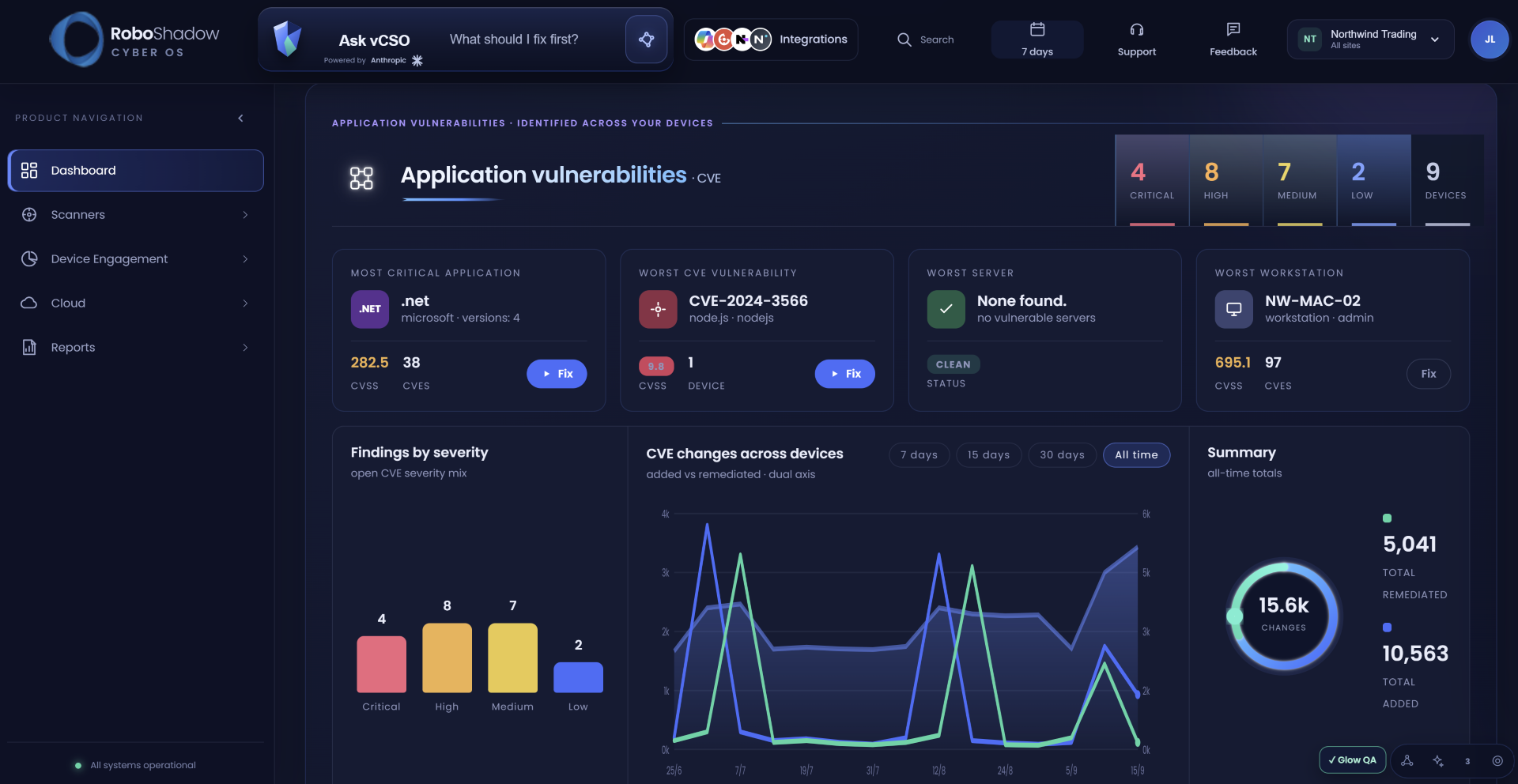
We'll soon be releasing a new Blue Theme as part of a wider refresh of the portal's look. New interfaces are rarely anyone's favourite surprise, so we're easing it in gradually, and any feedback you send while we do will help us get it right.
Coming soon
There's plenty more in the pipeline, and the following features will be landing in the portal shortly. We'll share more detail on each one as it arrives.
- Auto Un-Install
- AI Communicate for AI AutoFix
- Linux LAN Scan
- AI Pentest and CIS Benchmarks report redesign
- Patch Summary Report
In other news: Why we're adapting RoboShadow for AI
A lot of the work going into RoboShadow at the moment, from our AI Pentester to better control over shadow IT, comes back to how cyber security needs to adapt as AI becomes more capable. Terry talks through his thinking in our latest video, including where the real risks sit, why there's no need for panic, and why we think the security stack needs to start adapting now.
Terry also introduces the three areas we're developing in response, covering AI SIEM/SOC, AI penetration testing and application control. Early release sign-ups are now open for Sentinel SIEM/SOC, the AI Pentester and App Manager, so if you'd like to be among the first to try them, let us know at hello@roboshadow.com.
A quick reminder from the previous release
In case you missed the release before this one, there are six things in the portal worth a look:
- Patching Compliance Report (Beta): See which vulnerabilities are still within their Cyber Essentials or DORA remediation deadline and which have slipped past it.
- Full Vulnerability Report (Experimental): Every vulnerability type, every device, in a single Excel download.
- PSA Automatic Remediation: Application tickets are held back while RoboShadow attempts the upgrade itself, and only raised if the fix keeps failing.
- Bulk Service Actions: Start, stop or restart several Windows services at once from the Device Services table.
- Clearer Patch Levels: The OS Revision now shows in the OS Vulnerabilities table, the Hardware report and each device's Hardware tab.
- Redesigned Licence & Billing: A clearer view of your subscription, with easier payment management.
If you haven't had a chance to explore them yet, they're all ready for you to have a play with. And if you haven't signed up for our App Bounty yet, feel free to do so now, as we're giving out gift cards to people who send us good feedback.
Please include 'App Bounty Feedback' in the subject line when sending over any feedback to hello@roboshadow.com, and the team will make sure it gets to the right place 😊
Thank you to everyone who has taken the time to get in touch, and to everyone taking part in our App Bounty programme. Every bit of feedback helps us protect everybody that little bit better, so if you have any thoughts or questions, please don't hesitate to reach out to us at hello@roboshadow.com.
