
Before we jump into this next release, we just want to thank all of you for your valuable input and contributions over the past few updates. As always, we will continue to make changes to everything as your responses come through (it's what fuels the efficiency of our ‘Alpha → Beta → Production’ - aka - ‘Deshittification’ process!).
Without further ado, we're back with another update on some big upgrades around Security that will give you much tighter control over who accesses your RoboShadow environment, and from where. We’ve also included a section at the end covering some other improvements we've made based on all of your feedback.
Granular Tenancy-Level Permissions (Experimental Feature)
This new feature introduces more fine-grained permissions, allowing precise actions at the Tenancy level.
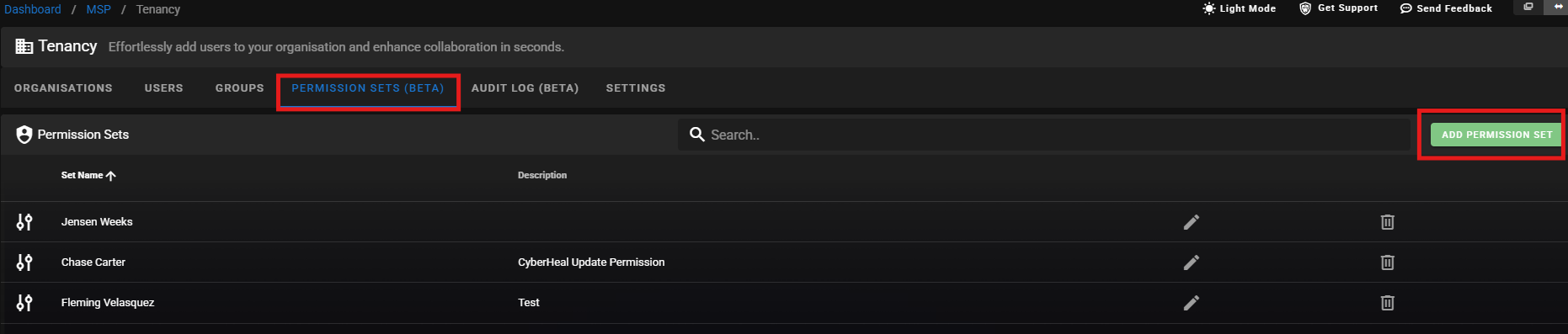
Please note: This feature is in Beta and can be enabled through Experimental Features under 'Fine-Grained Permissions'. You may come across some bugs but we’re rapidly working on refining and perfecting this for you.
We previously offered only two permission levels: Admin (full access) or Read Only, and while it might work fine for smaller setups, we’re conscious that growing teams and client bases will benefit from more precise control.
That’s why we’ve released Permission Customisation to allow you to define exactly what a group of users can access at the feature level.
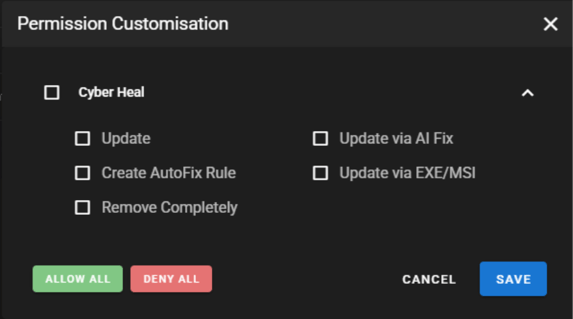
This ability has been highly requested for a while now, and we're also working on getting Granular Level Permissions for Remote Desktop, Reporting, and more coming soon. We’d love to get some more feedback from you all on this current release with some suggestions on what you want to see next!
Watch Charlie’s video tutorial here:
Here's how it works:
- Create a Permission Set at the tenancy level: name it, describe it, and configure the specific feature permissions you want.
- Assign it to a Tenancy Group: all users in that group automatically inherit the permissions.
- Stack multiple sets: a group can have several permission sets for flexible combinations.
This will be useful with things like giving your helpdesk team visibility into alerts and devices without access to billing or integrations, or letting a client’s internal IT team see their own reports without being able to change configurations. Only users with the right permission set will be able to view or manage PSA ticket data.
IP Lockdown (Portal & APIs)
Our new IP Lockdown feature is now fully released, and restricts access to the RoboShadow portal and APIs to specific, trusted IP addresses only. Once enabled, only requests from your approved IP addresses will get through – everything else is blocked.

IP Lockdown is extensively implemented across the entire platform: Devices, Vulnerabilities, Software inventory, Antivirus, LAN scanner, External Scanner, Dark Web monitoring, alerts, Benchmarks, and more to give you full platform coverage.
This is especially valuable in meeting compliance requirements (ISO 27001, SOC 2, Cyber Essentials), or if you just want peace of mind that your security data can only be reached from specific, trusted networks.
Watch Charlie’s video tutorial here:
MFA Required Coming Soon
Coming shortly, we will be updating MFA requirements to make it so that all users must have MFA to access the portal. This update is coming along as it's only getting easier for credentials to be compromised, and this second layer of verification will make a big difference in your security posture, protecting you even if your password is compromised.
As a cyber security platform, we need to lead by example, and so this is a natural step towards doing that and protecting your organisation's security data.
In Other News...
Since last week’s email and blog on Device Management Upgrades, we’ve had some really great feedback from you all, and we’ve already started working on making some changes for you 😊
Here's an overview of changes we're making from the previous release:
- Archived Devices Bug Fix - We’ve removed a bug that wouldn’t allow some organisations to archive devices.
- Maintenance Windows - We’re in the process of adding in a ‘days of the week’ option to Maintenance Windows.
- Device Groups - We’re working on ways to give you more clarity on the difference between Tenancy Level and Organisation Level Device Groups.
We’ve also added:
-
Command History for Script Running (PowerShell Package Manager)
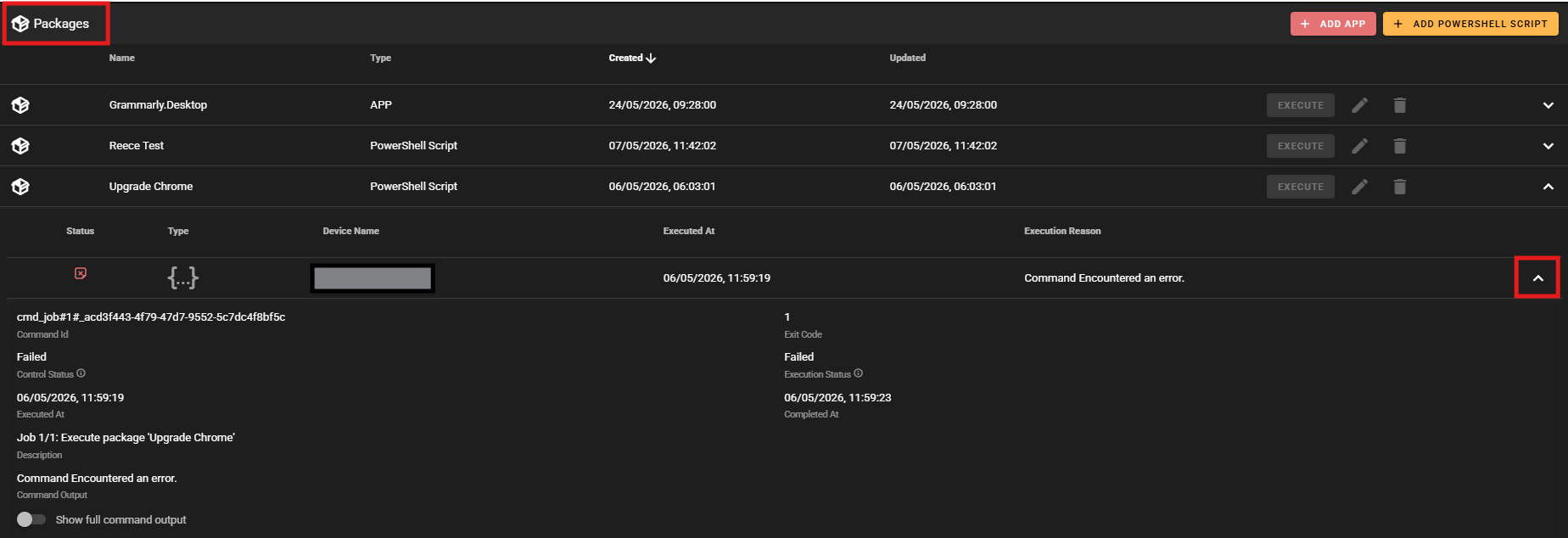
Command History is now available for Script Running - every execution is tracked giving you a full audit trail of what was run, when, and on which devices. We've heard your requests for more control and flexibility when managing your devices, and this update will allow you to maintain full visibility into what's happening across your estate, which will come in handy for compliance / troubleshooting purposes, and managing your environment more effectively.
And updated:
-
Data/Disks: Encrypted Disks
Score cards on this page that were previously labelled ‘Unencrypted’ have now been changed to ‘Encrypted’, and the dashboard now shows your encrypted device count rather than the unencrypted count, so a higher number will mean you’re in better shape!
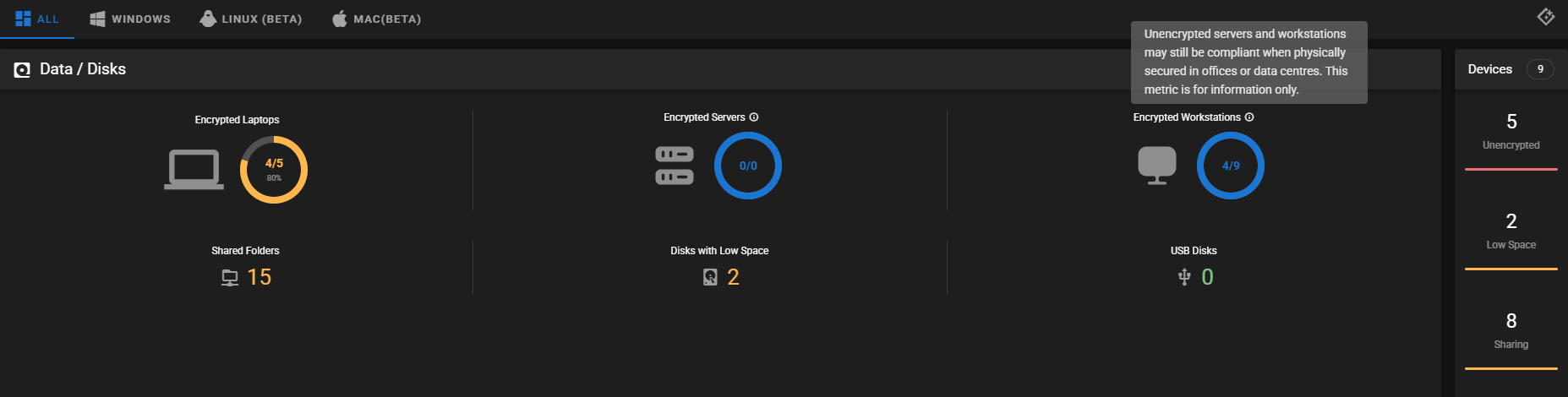
We have also added new Tooltips for context and clarity, and improved the Scorecard display, redesigning how your data is presented:
- Laptops are now the hero metric.
- Servers & Workstations are now informational.
- Colour logic now makes sense.
The same changes are also reflected in the Ultimate Report export, so your generated reports will show the updated layout and wording too 😊
Other little updates based on your feedback:
- Improved Logo Implementation:
You can now add dark logos which will be visible when light mode is on. - End-of-Life (EOL) Visibility in One-Click Fix:
EOL data now surfaces directly in the One-Click Fix View. - Faronics Anti-Virus Detection:
RoboShadow now automatically detects Faronics Anti-Virus as a third-party AV provider. Devices running Faronics AV will now appear correctly in your antivirus coverage reports. - Microsoft 365 Benchmark Improvements:
We’ve aligned our evaluation of the sign-in risk benchmark with the latest CIS Microsoft 365 Foundations Benchmark guidance.
- CSV Download for Enumerated Subdomains:
You can now export your enumerated subdomains to CSV directly from the Domain Enumeration page. (Click the download icon in the Sub-Domains toolbar to save the full list - handy for reporting or feeding into other tools). - vCSO Summaries Now Cross-Platform:
The vCSO Generate Summary report now includes data from Windows, Mac, and Linux agents - includes devices overview, antivirus coverage, disk encryption, firewall, and OS breakdown. - SentinelOne Detection Improved on Linux:
Agent now correctly identifies the SentinelOne packages and daemon, so your Linux antivirus coverage reports will be accurate.
- "Self Destruct" Renamed to "Uninstall Agent":
Same functionality with clearer language, this simply removes the RoboShadow agent from a device. - Agent Improvements:
Under the hood, we’ve cleaned up EXE registry entries and reduced the size of our PowerShell scripts, making the agent lighter and more efficient on your devices. Additionally, we now walk the full SPF include chain and verify Microsoft’s IP ranges are covered, so flattened SPF records are correctly recognised and compliant.
A little reminder:
-
Audit Logs
We released this a while back, but wanted to give it another shout out as it seems a lot of you still don’t know about this feature, and we don’t want any of you missing out! We’re planning on taking this out of Beta soon so we would love to get some more feedback from you all before fully releasing.
Audit logs give you a full trail of activity across your tenancy, so that you can see who did what, when it happened, and the details behind each action.
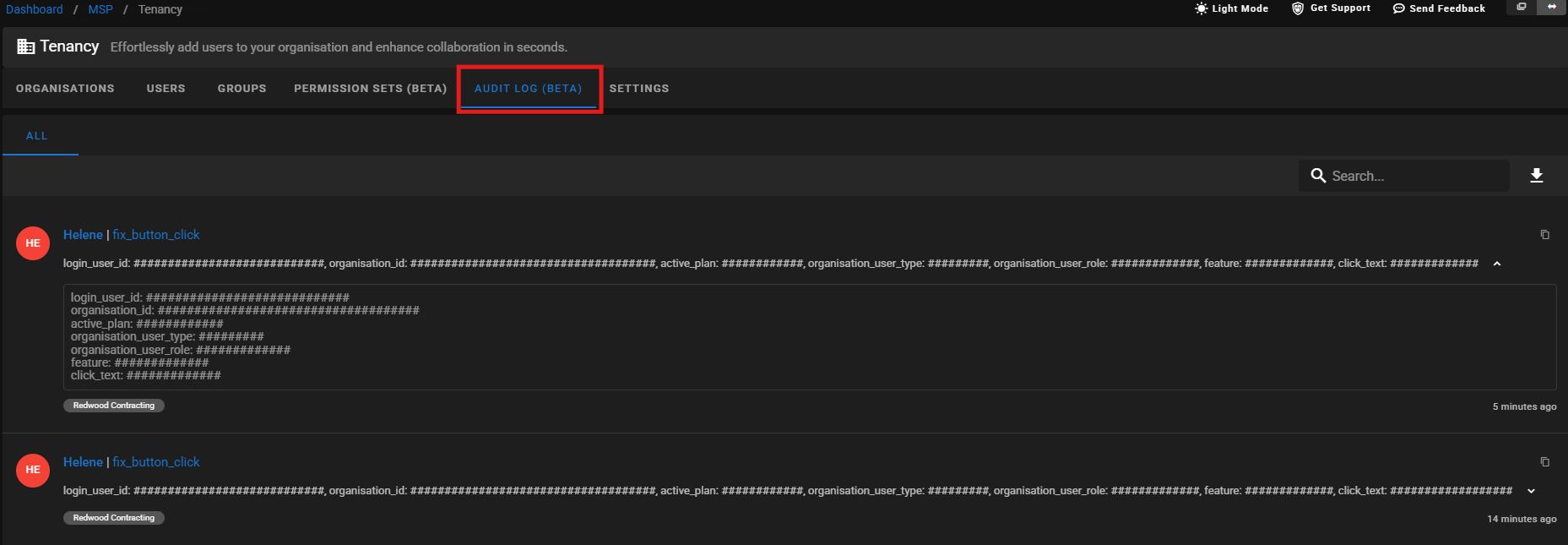
This is very useful for general oversight, as well as when you need to investigate something specific or maintain a record for compliance purposes.
Each log captures the action itself, the user responsible, and the underlying detail behind the event, so you're not just seeing that something changed, but what actually changed. It gives you a clearer view of how the platform is being used across your organisation.
Additionally, there’s built-in search and filtering, so you can quickly narrow things down by user or activity, along with the option to export logs if you need to share them externally or keep longer-term records.
We'd greatly appreciate if you could have a browse and let us know how you're finding these changes, and where else you would like to see similar improvements made on the platform!
As always, thank you for your ongoing support and feedback, and if you have any questions, please don’t hesitate to reach out to us at hello@roboshadow.com
